Ventla
- 3.8
- Rating
- 50.00K
- Installs
- Free
- Price

 Analysis by App-foxy
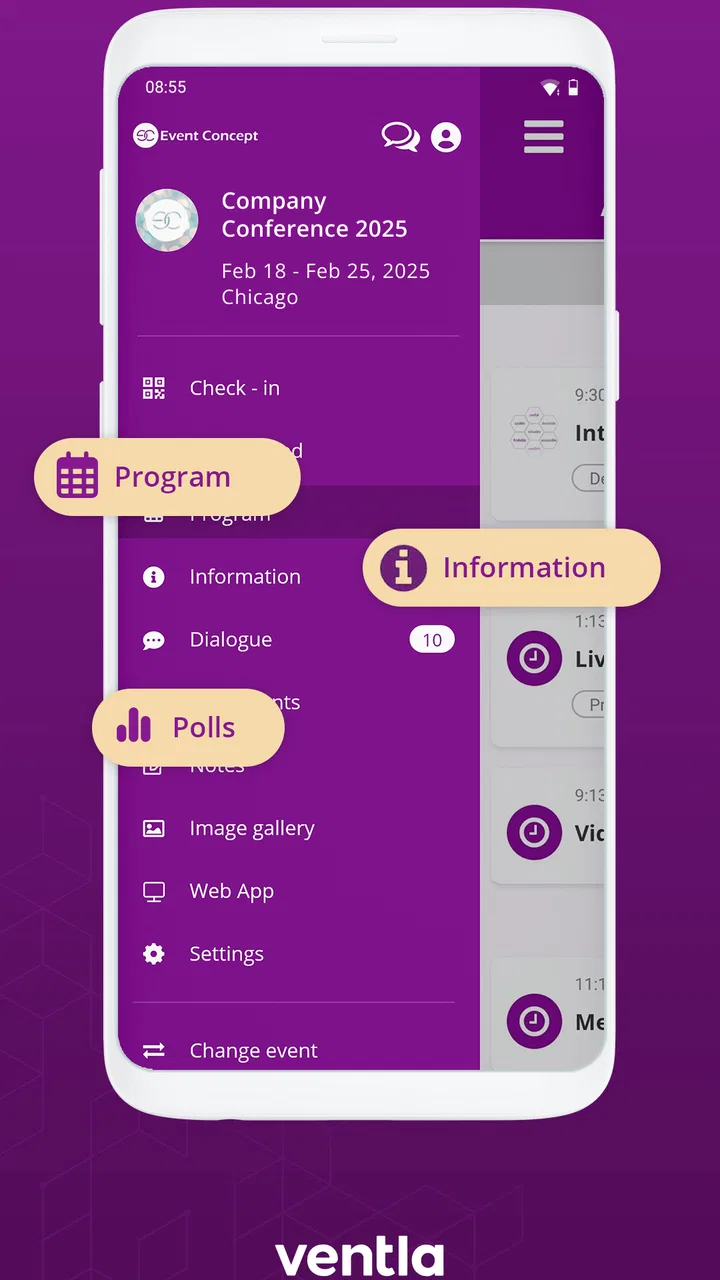
When I install an event app, I want it to reduce the small stresses around attending something: finding the right information, knowing what is happening next, and having a clear place to check updates. Ventla is built for that setting. It is a free events app from Ventla, and its purpose is more focused than that of a general social network or a standard calendar. I see it as a companion for an organized event rather than an app I would open every day without a specific occasion in mind.
That distinction matters. An event app can be genuinely useful when the organizer keeps information current and attendees know where to look. It can also feel unnecessary when the event is small, the schedule rarely changes, or all the important details already fit comfortably in an email. My experience with Ventla left me with a cautious but positive impression: it makes the most sense when an event has several moving parts and participants need one shared digital space.
What Ventla is like to use around an event
Ventla sits in the events category and is developed by Ventla. The app has been available since late September 2017, which gives it a more established feel than a brand-new event tool. Its current version is 5.4.4, and it runs on Android devices using version 8.0 or later. That minimum requirement is still reasonable for many users, although anyone using an older phone should check compatibility before planning around it.
You May Also Like

 Blood Strike: 2.5 Anniversary
Blood Strike’s Loadouts Turn Every Drop Into a Tactical Gamble
A close look at Blood Strike’s custom loadouts: how fast access to signature weapons reshapes its battle royale rhythm, rewards preparation, and narrows the gap between fights.

 Pandora - Music & Podcasts
Pandora’s Music Is Easy to Start, but Harder to Recover
Pandora’s strength is its low-effort path from a seed to a station. Its weak spot is how much confidence it asks you to place in connection, setup, and quiet recovery.

 8 Ball Pool
 Is Built on Rivalries, Rematches, and Routine
A close look at the rivalries, rematches, shared routines, and unanswered safety questions that turn a quick pool match into a persistent mobile community.

 Samsung Music
’s Quiet Strength Is Playing What You Already Own
Its reach comes less from spectacle than from dependable access to a personal library. That simplicity is both the app’s strongest retention engine and its ceiling.

 AccuWeather: Weather Radar
AccuWeather Review: A Quick, Clear Forecast for Everyday Decisions
For everyday plans, the best forecast is the one you can understand quickly. AccuWeather makes rain timing, radar, and local conditions easy to act on, with a few trade-offs.

 Hill Climb Racing
Why Hill Climb Racing Still Turns Crashes Into One More Run
A tiny car, a bumpy hill and one more upgrade: Hill Climb Racing keeps resurfacing because its simple chaos makes every near-miss feel personal.
More From Our News Desk



The app is free to download and carries an Everyone content rating. It has passed the fifty-thousand-install mark and holds an average rating of 3.8 from roughly two hundred ratings, with a dozen written reviews. Those figures suggest a real but fairly specialized audience rather than a mass-market service. I would not interpret the rating as a guarantee of a smooth experience for every event, because much depends on how the organizer configures and maintains the event space.
That organizer dependency is the first important point. Ventla is not like a normal calendar where I control every entry myself. The value comes from the event environment made available to me. If the host provides a well-structured schedule and keeps notices relevant, the app can replace scattered messages and paper handouts. If the host uses it only as a digital noticeboard and does not update it, the installation may feel like an extra step.
I also appreciate that the app’s identity is clearly tied to events rather than trying to become a general-purpose communication platform. That narrower role makes the decision easier: I would install it for a conference, gathering, meeting, or organized occasion when the host expects attendees to use it. I would not install it simply because I need a personal task list, a private calendar, or a broad community feed.
Why the event context changes the experience
With a normal calendar, I enter an appointment and receive a reminder. With Ventla, the useful question is broader: what information does the event require me to consult while I am participating? A schedule with several sessions, changing locations, announcements, or shared attendee information benefits more from a dedicated event space than a single calendar entry does.
A realistic example would be a full-day professional gathering. Before leaving home, I could use the event app to orient myself around the day instead of searching through an email thread. During the event, I would be more likely to open the app between sessions than to scroll through old messages. Afterward, it could remain useful as a reference point for information that would otherwise be buried in a crowded inbox.
The trade-off is that this convenience depends on preparation. I would download and open the app before arriving, not while standing outside the venue with a low battery and a poor connection. I would also check whether the event has been made available to me and whether the information looks complete. That quick check can prevent the common frustration of discovering that an app is technically installed but not yet useful.
Trust begins with what the app visibly asks me to do
For an event app, trust is less about impressive wording and more about visible choices. I want to know why I am being asked to create or use an account, what event I am joining, and which parts of my profile or activity are visible to other participants. Ventla should be judged through those screens and choices rather than through assumptions about what every event app does.
I would pay attention during setup to whether the app clearly identifies the event and gives me a straightforward way to proceed. If a screen asks for information, I would consider whether that information makes sense for the event. A professional gathering may reasonably need an attendee identity, while a casual meeting may not need the same level of detail. The practical rule is simple: provide what is necessary for the event experience, and pause when a request does not have an obvious purpose.
I would also avoid treating a prefilled profile as automatically public. Event tools sometimes include directories or participant-facing details, but visibility should be understood from the controls shown inside the app or from the organizer’s instructions. My most important trust check is whether I can see and manage what I am sharing before I participate. If that is unclear, I would ask the event organizer rather than guessing.
Because Ventla may be used for different kinds of events, the privacy experience can vary from one event space to another. That is not a reason to reject it, but it is a reason to stay attentive. The same app can feel appropriately limited at one event and more socially exposed at another depending on the choices made by the host.
Account control matters more than the download itself
One question I would have before using Ventla is what happens when I attend several events. I would look for a clear way to switch between event spaces, review the account connected to the app, and leave an event when it is no longer relevant. I would also check whether notifications can be adjusted, because event alerts are helpful during a busy schedule but irritating when they continue after the occasion has ended.
These are not minor details. An event app can become cluttered if old events, inactive notifications, or unnecessary profile information remain visible. My preferred workflow would be to review notification settings at the start, keep only the alerts that help me act, and revisit them after the event. If Ventla presents those choices clearly, it supports a healthier relationship with the app. If the controls are difficult to find, the burden falls back on the user.
I would use a separate, sensible password if the app requires account credentials, and I would avoid sharing login details with another attendee just to save time. That is especially important when an account is connected to more than one event. A shortcut that feels harmless at a venue can create confusion later about whose information is being displayed or changed.
Another useful habit is to confirm the event name and organizer before interacting with content. If several invitations or event spaces appear, I would not assume that the first one is the correct destination. This is a small but valuable safeguard against posting or responding in the wrong place, particularly when the app is being used for several gatherings close together.
Data-sensitive moments during real use
The most sensitive moments are usually not the first launch. They happen when an event asks me to complete a profile, identify myself to other attendees, respond to a message, or share information that feels more personal than the schedule itself. I would slow down at those points and distinguish between information needed for participation and information that is merely convenient for networking.
For example, an attendee name may be useful in an event directory, while a personal contact detail may not be necessary for everyone to see. If Ventla offers a choice about profile visibility, I would select the narrowest option that still lets me take part comfortably. If the organizer explains a different arrangement, I would make that decision knowingly rather than accepting every field by habit.
Notifications deserve similar care. A lock-screen preview can reveal event-related information to anyone who happens to see the phone. I would use the device’s notification controls to reduce previews if the event involves private discussions, internal meetings, or sensitive scheduling. This is not a claim about Ventla’s underlying data practices; it is a practical way to limit accidental exposure on my own device.
I would also be careful with photographs, comments, or messages connected to an event. Before posting, I would ask who may be able to see the content and whether the post could remain associated with the event after I leave. An event app can make sharing feel informal because the audience is gathered in one place, but the consequences may be less informal once information is copied or remembered by others.
When an event is over, I would review the app rather than simply forgetting it. I would turn off unnecessary notifications, remove information I no longer need from my own device where the app allows it, and check whether I still want the app installed. If I expect to attend another Ventla-based event soon, keeping it may be convenient. If not, uninstalling it is a reasonable way to reduce clutter and avoid accidental attention.
Where Ventla is stronger than ordinary alternatives
The usual alternative is a mixture of email, a calendar entry, a messaging group, and perhaps a printed schedule. That combination can work, but it fragments attention. One message contains the venue, another contains a change, and the calendar holds only the basic appointment. Ventla is more appealing when the event needs a single point of reference instead of a chain of separate updates.
Compared with a general messaging app, a dedicated event space should be easier to scan. A chat thread is good for quick conversation but poor at preserving structure once many messages arrive. Ventla’s event-focused design is better suited to looking for the day’s context without searching through unrelated personal conversations. I would choose it when organization matters more than casual back-and-forth.
Compared with a calendar app, Ventla has a wider event role. A calendar tells me when to be somewhere; an event app can serve as the place where I orient myself around the occasion. That does not make it a replacement for my calendar. I would still keep important appointments in my normal calendar, especially when I need reminders that remain visible alongside work and personal commitments.
The comparison changes for a very small event. If four people are meeting for an hour and the plan fits in a message, installing a separate app may create more friction than value. In that situation, a calendar invitation or ordinary group chat is probably better. Ventla earns its place when the event has enough information, movement, or coordination to justify a dedicated home.
Three practical habits that improve the experience
My first tip is to treat the app as a preparation tool, not just an arrival tool. I would open the event space before traveling, identify the information I expect to need, and save the event’s key details in my own mental plan. This gives me time to notice an incomplete schedule or an account issue while I can still contact the organizer.
My second tip is to separate essential alerts from background noise. During an active event, timely updates can be valuable. Outside the event, the same notifications can become distracting. I would adjust alerts at the start and again when the event ends. This two-stage approach is more effective than leaving every notification enabled and hoping the app becomes quiet on its own.
My third tip is to make a privacy decision before filling in optional-looking profile areas. I would decide whether I want to be discoverable to other attendees, what name I am comfortable displaying, and whether I want to participate in social features at all. That prevents the pressure of making a rushed choice when everyone is already networking.
A fourth useful habit is to keep a fallback. I would note the venue, start time, and the name of the event somewhere I can reach without relying entirely on the app. This is not a criticism unique to Ventla; any event platform can become inconvenient if the phone battery is low, access is interrupted, or the organizer changes plans without updating the digital space. A small backup protects the important basics.
Who should use it, and who should skip it
I would recommend Ventla to attendees of structured events who want one place to consult during the day. It is especially suitable when the schedule is more complicated than a single appointment, when updates may matter, or when the organizer has clearly committed to using the platform. It can also suit people who dislike searching through long email chains for the latest event information.
I would be more cautious about recommending it to someone who is highly sensitive to account creation, profile visibility, or event-related notifications. That person should inspect the available controls carefully and ask the organizer how attendee information will be handled before joining. The right decision may still be to use it, but only after understanding the choices presented during setup.
I would skip it for a simple gathering with no changing schedule and no shared event material. I would also avoid making it my everyday planner, because its usefulness is tied to event participation rather than personal time management. A standard calendar remains the better tool for recurring appointments, private reminders, and a unified view of daily commitments.
My cautious verdict after using it
Ventla is a focused event companion rather than an app I would keep at the center of my digital life. Its strongest quality is the possibility of bringing event information into one dedicated space, which is more orderly than relying on scattered messages. Its main weakness is equally clear: the experience depends heavily on how the organizer builds the event and how carefully I manage notifications, profile details, and participation choices.
The free price removes the biggest barrier for attendees, and the Everyone rating makes it broadly approachable. Still, free does not mean frictionless. I would check device compatibility, open the event space before the day begins, and review the visible account and privacy controls rather than accepting the setup automatically.
My final recommendation is therefore conditional but favorable. If an organizer asks me to use Ventla for a substantial event, I would install it and give it a fair chance, while keeping my normal calendar as a backup. If the event is tiny or the app’s user choices are not clear enough for my comfort, I would prefer a simpler alternative. Used with that judgment, Ventla is a practical way to keep an organized event from becoming a pile of disconnected updates, and its value is greatest when both the host and the attendee use it deliberately.
FAQs for Ventla
01What is Ventla and what features does it offer?
Ventla is a versatile event management app designed to streamline the planning and execution of events. It offers features such as attendee registration, live polling, networking opportunities, and agenda management. Its user-friendly interface and robust analytics tools make it ideal for both small gatherings and large conferences.
02Is Ventla available for both Android and iOS devices?
Yes, Ventla is available for download on both Android and iOS platforms. Users can find it on the Google Play Store and the Apple App Store. This cross-platform availability ensures that both Android and iOS users can seamlessly access and utilize the app's functionalities.
03Does Ventla require a subscription or in-app purchases?
Ventla offers a variety of pricing options, including a free version with basic features and premium subscriptions that unlock additional tools and capabilities. Users can choose the plan that best suits their needs, whether they're planning a small event or managing large-scale conferences.
04How secure is my data on Ventla?
Ventla prioritizes user data security with robust encryption and data protection measures. The app complies with industry standards and regulations to ensure that all personal and event-related information remains private and secure, providing peace of mind for both organizers and attendees.
05Can Ventla integrate with other tools and platforms?
Yes, Ventla supports integration with various third-party tools and platforms, such as calendar apps, social media, and CRM systems. This allows users to streamline their event management process by connecting Ventla with their existing digital ecosystem, enhancing efficiency and collaboration.
Pros
- Intuitive user interface design.
- Seamless event management tools.
- Real-time updates and notifications.
- Customizable attendee interaction features.
- Robust analytics for event insights.
Cons
- Limited offline functionality.
- Occasional sync issues with calendar apps.
- Some features behind paywall.
- Requires stable internet connection.
- No integration with all social media.

Ventla
Gallery